立即下載Download Now
免費、開源、免安裝。Windows 雙擊即用。Free, open source, portable. Double-click on Windows.
為什麼需要下載工具? Why Do You Need a Download Tool?
線上觀看 Jable TV、MissAV 等影片網站時,常會遇到幾個惱人的問題:廣告彈窗太多、播放卡頓緩衝、載入速度慢。如果能預先把影片下載到電腦,就能享受流暢無廣告的觀看體驗。 When streaming videos on sites like Jable TV or MissAV, you often run into annoying issues: too many ad popups, playback buffering, and slow loading. Downloading videos to your computer lets you enjoy smooth, ad-free viewing.
但問題是,這些網站的影片都使用 M3U8/HLS 串流協定,不像一般的 MP4 檔案可以直接右鍵另存。市面上的下載工具大多需要命令列操作,對一般使用者來說門檻太高。 The problem is these sites use M3U8/HLS streaming protocol, so you can't just right-click and save like regular MP4 files. Most download tools require command-line operation, which is too complex for average users.
JableTV Downloader 就是為了解決這個問題而開發的。它提供完整的圖形介面,讓你像使用一般應用程式一樣輕鬆下載影片。 JableTV Downloader was built to solve this problem. It provides a full graphical interface, letting you download videos as easily as using any regular app.
跟其他工具有什麼差別? How Does It Compare to Other Tools?
市面上有一些 CLI 命令列工具和瀏覽器外掛可以下載 Jable 的影片,但跟 JableTV Downloader 比起來差距明顯: There are some CLI tools and browser extensions that can download Jable videos, but the differences are significant:
| JableTV Downloader | CLI 工具CLI Tools | 瀏覽器外掛Extensions | |
|---|---|---|---|
| 圖形介面GUI | ✓ | × | × |
| 支援 MissAVMissAV | ✓ | 通常不Usually no | ✓ |
| 批量並行Batch Parallel | 10 路10 threads | 1 | 1 |
| 內建瀏覽Built-in Browse | ✓ | × | × |
| 免安裝Portable | .exe | Python | ✓ |
| 進度條Progress | ✓ | 文字Text | × |
| 持續更新Maintained | 2026 | 多已停更Dead | 不穩定Unstable |
功能特色 Features
完整下載器(JableTV_Modern.exe) Full Downloader (JableTV_Modern.exe)
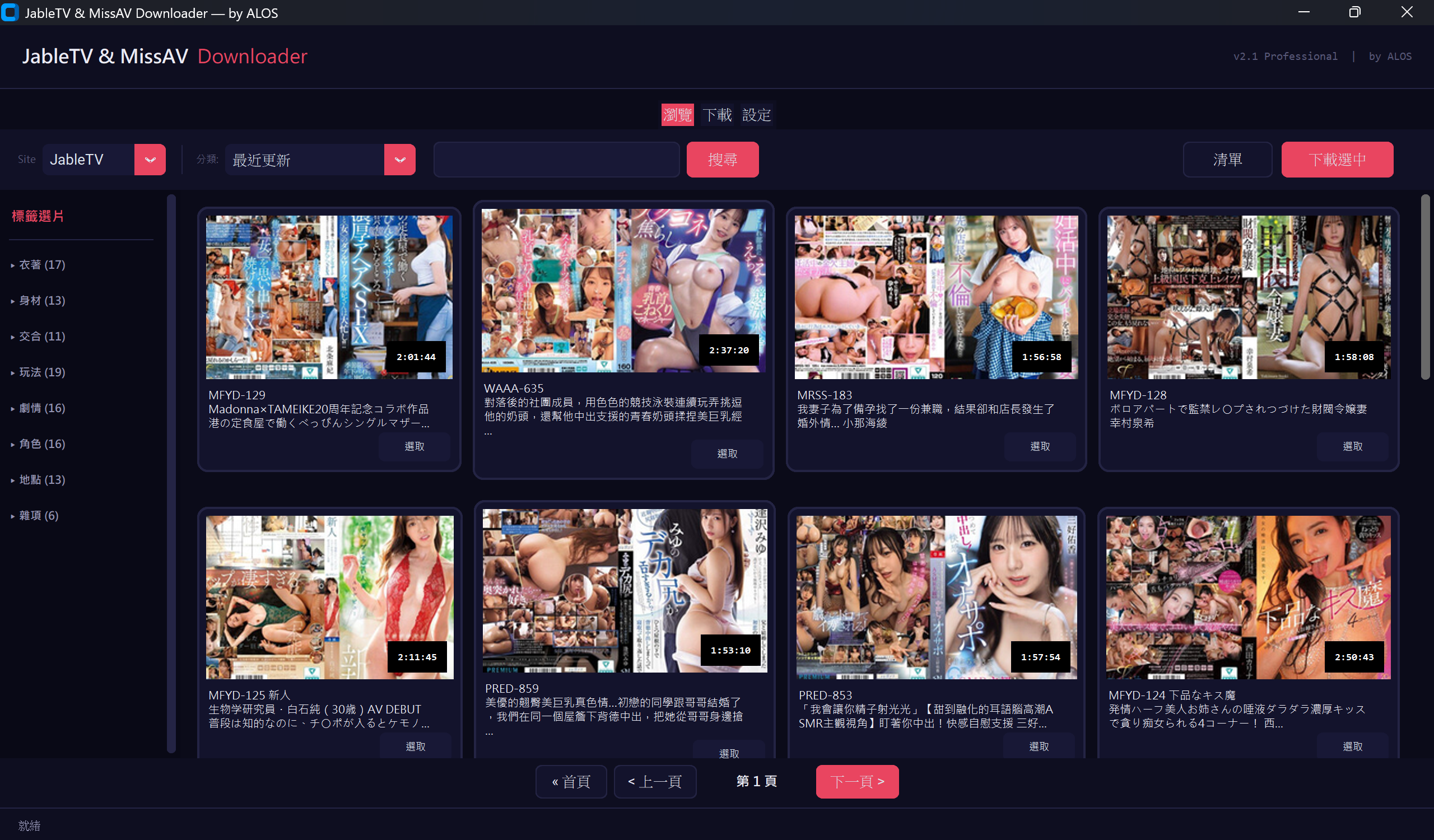
- >Material Design 原生介面Native UI — 深色主題桌面應用,無需瀏覽器Dark theme desktop app, no browser needed
- >內建瀏覽器Built-in Browser — 直接在 App 內瀏覽分類、搜尋關鍵字、翻頁Browse categories, search keywords, paginate in-app
- >多選下載Multi-Select — 勾選多部影片,一鍵送入下載佇列Check multiple videos, send to download queue in one click
- >10 路並行下載10 Parallel Downloads — 同時下載最多 10 部,可於設定頁調整Download up to 10 simultaneously, configurable in settings
- >畫質選擇Quality Selection — 最高畫質(預設)或最低畫質(省流量)Highest (default) or lowest quality (save bandwidth)
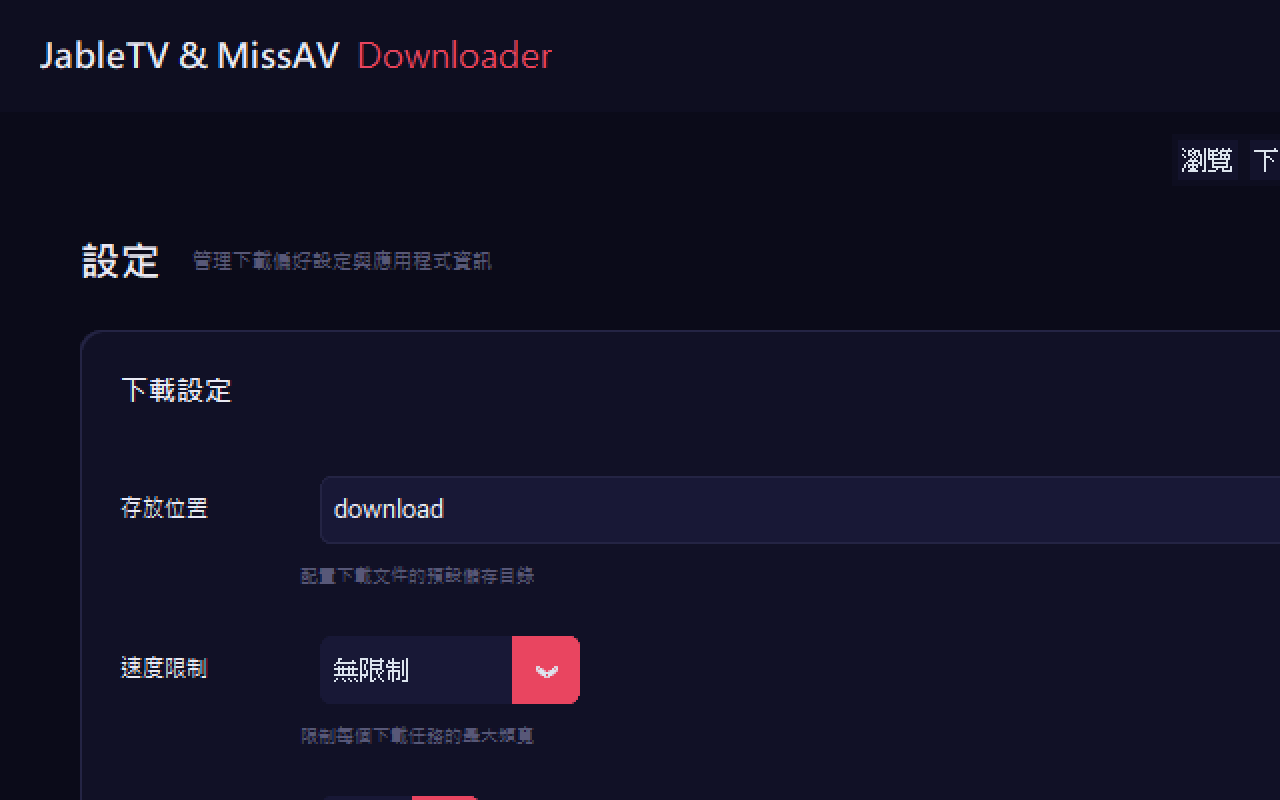
- >速度限制Speed Limit — 可設定 1/2/5/10/15 MB/s 或無限制Set 1/2/5/10/15 MB/s or unlimited
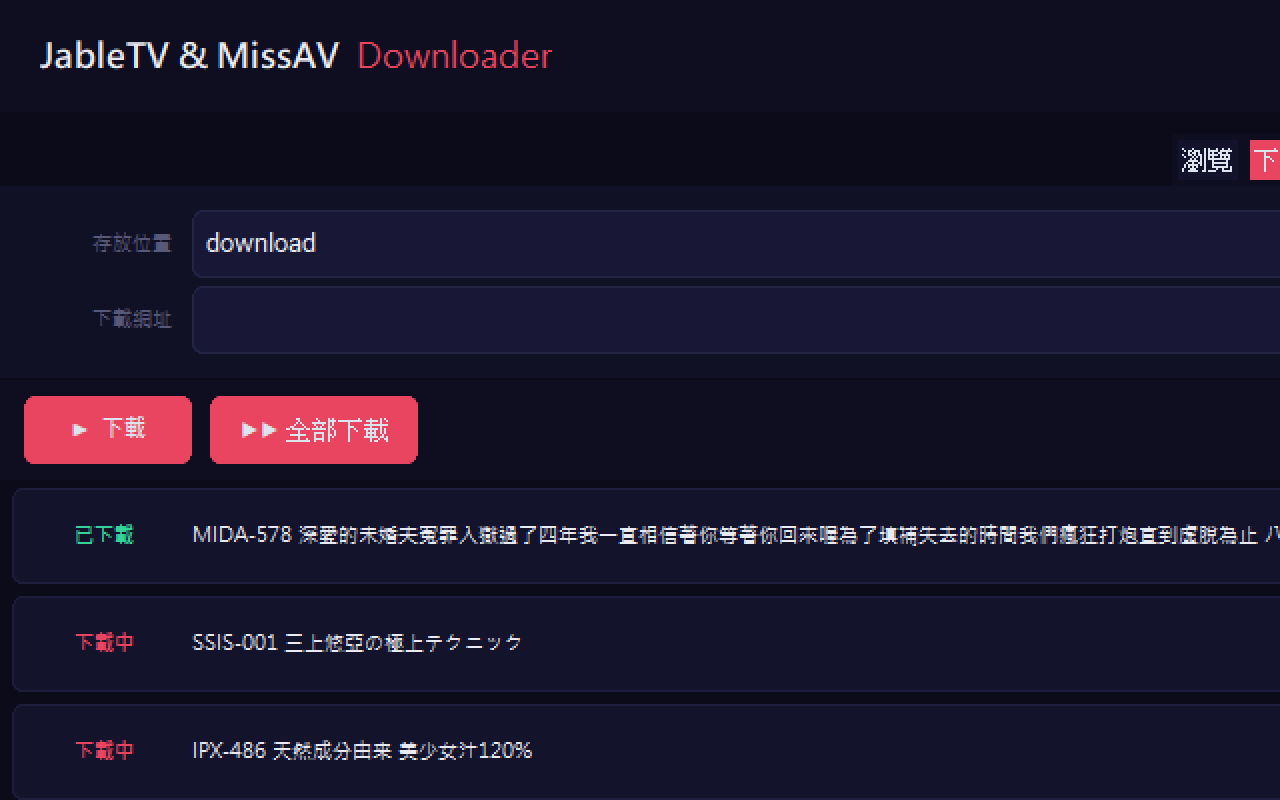
- >即時進度條Real-time Progress — 每部影片獨立顯示進度、速度、狀態Per-video progress, speed, and status display
- >智慧剪貼簿Smart Clipboard — 複製網址自動偵測加入佇列Auto-detect copied URLs and add to queue
- >自動合併Auto Merge — TS 片段自動合併為完整 MP4Auto merge TS segments into complete MP4
- >斷點續傳Resume Downloads — 取消後重新下載,已完成片段不會重抓Resume interrupted downloads without re-fetching completed segments
- >高 DPI 支援HiDPI Support — 自動適配高解析度螢幕Auto-scale for high resolution displays
每日自動下載(Jable_smalltool.exe) Daily Auto-Download (Jable_smalltool.exe)
- >一次設定,每日自動Set Once, Auto Daily — 選一次資料夾,程式每 24 小時自動檢查Pick a folder once, app checks every 24 hours
- >鎖定中文字幕Chinese Subtitles Only — 只抓有中文字幕的新片Only downloads videos with Chinese subtitles
- >去重記憶Deduplication — 下載過的不會重抓Already downloaded videos won't be re-downloaded
- >可背景常駐Background Mode — 最小化到工作列即可Minimize to system tray
使用方式 How to Use
下載並執行Download and Run
前往 GitHub Releases 下載 JableTV_Modern.exe(約 27 MB)。雙擊執行,不需要安裝任何東西。 Go to GitHub Releases and download JableTV_Modern.exe (~27 MB). Double-click to run — no installation needed.
瀏覽影片Browse Videos
切換到「瀏覽」分頁,選擇 JableTV 或 MissAV,瀏覽分類或搜尋關鍵字。看到喜歡的影片,勾選前方的核取方塊。 Switch to the "Browse" tab, select JableTV or MissAV, browse categories or search keywords. Check the checkbox next to videos you like.
開始下載Start Downloading
點擊「下載選中」或切換到「下載」分頁直接貼上網址。下載佇列會顯示每部影片的即時進度條、下載速度和狀態。 Click "Download Selected" or switch to the "Download" tab and paste URLs directly. The queue shows real-time progress bars, speed, and status for each video.
調整設定(選用)Adjust Settings (Optional)
在「設定」分頁可以調整:存放位置、速度限制、並行下載數、畫質選擇。預設值已經夠用,但你可以依需求微調。 In the "Settings" tab you can adjust: save location, speed limit, parallel downloads, quality selection. Defaults work well, but you can fine-tune as needed.
macOS / Linux 使用者 macOS / Linux Users
非 Windows 使用者可以透過 Python 直接執行。確認已安裝 Python 3.8 以上版本: Non-Windows users can run it directly with Python. Make sure you have Python 3.8+ installed:
支援網站 Supported Sites
| 網站Site | 瀏覽Browse | 搜尋Search | 下載Download |
|---|---|---|---|
| Jable.tv | ✓ | ✓ | ✓ |
| MissAV | ✓ | ✓ | ✓ |
| 其他 M3U8Other M3U8 | — | — | ✓ |
立即下載Download Now
免費、開源、免安裝。Windows 雙擊即用。Free, open source, portable. Double-click on Windows.